Mesh WiFi Routers






TP-Link Deco X60 AX3000 Wi-Fi 6 Mesh System (2-Pack)

Asus Zenwifi XD4 2 Pack Whole-Home Dual-band Mesh WiFi 6 - White

Asus Zenwifi XD4 1 Pack Whole-Home Dual-band Mesh WiFi 6 - White

Asus ZenWifi XD5 WiFi Mesh System - 2 Pack

TP-Link AXE5400 Deco XE75 Whole Home Mesh Wi-Fi 6E System(Tri-Band)- 2PK

TP-Link Deco X50 AX3000 Whole Home Mesh Wi-Fi 6 System, 3 pack

TP-Link Deco X50(2-pack) AX3000 Whole Home Mesh Wi-Fi 6 System, 2 pack

TP-Link Deco M4(3-pack) AC1200 Whole-Home Mesh Wi-Fi System(3-pack)

TP-Link AC1200 Whole-Home Mesh Wi-Fi System(2-pack)

ASUS ZenWiFi BT8 (1 Pack) Whole-Home Tri-band Mesh WiFi 7 Router

Asus Zenwifi XD4 Plus 1 Pack Whole-Home Dual-band Mesh WiFi 6 - Black

Asus Zenwifi XD4 Plus 2 Pack Whole-Home Dual-band Mesh WiFi 6 - Black

Asus Zenwifi XD4 Plus 2 Pack Whole-Home Dual-band Mesh WiFi 6 - White

ASUS ZenWiFi BD4 (2 Pack) Whole-Home Dual-band Mesh WiFi 7 Router

Asus ZenWifi XD5 WiFi Mesh System - 1 Pack

TP-Link BE9300 Whole Home Mesh Wi-Fi 7 System Deco BE65(3-pack)

Asus RP-AX58 Dual-Band AX3000 WiFi 6 Mesh Range Extender

TP-Link Deco X20 AX1800 Wi-Fi 6 Mesh System (2-Pack)

Asus ZenWifi XD5 WiFi Mesh System - 3 Pack

ASUS ZenWiFi BD4 (3 Pack) Whole-Home Dual-band Mesh WiFi 7 Router

ASUS ZenWiFi BT8 (3 Pack) Tri-band WiFi 7 (802.11be) Smart AiMesh Extendable Router

Asus ExpertWiFi EBM68 Business Mesh System EBM68( 1PK)

ASUS ZenWiFi BT10 Tri-band WiFi 7 (802.11be) Mesh Router (3 Pack)

ASUS ZenWiFi BT8 (2 Pack) Whole-Home Tri-band Mesh WiFi 7 Router

TP-Link Deco X60 AX5400 Wi-Fi 6 Mesh System (3-Pack)

MSI Roamii BE Pro Mesh System- 2 Pack

ASUS RT-BE82U Dual-band WiFi 7 (802.11be) Smart AiMesh Extendable Router

ASUS RT-BE50 Dual-band WiFi 7 (802.11be) Smart AiMesh Extendable Router

Asus ZenWiFi BQ16 (2pk) BE25000 Quad Band WiFi 7 Mesh Router

Asus ZenWiFi BQ16 (1pk) BE25000 Quad Band WiFi 7 Mesh Router

ASUS ZenWiFi BT10 Tri-band WiFi 7 (802.11be) Mesh Router (2 Pack)

ASUS ExpertWiFi EBM68 Business Mesh System (2PK)

MSI Roamii BE Lite WIFI 7 Mesh System- 1 Pack

MSI Roamii BE Lite WIFI 7 Mesh System- 2 Pack

Asus ROG Rapture GT6 Tri-Band WiFi 6 Mesh WiFi System - 2 Pack Black

TP-Link Deco X20 AX1800 Wi-Fi Mesh System (3-Pack)

ASUS ZenWiFi Pro ET12 AXE11000 Mesh System Pack of 1

TP-Link BE19000 Whole Home Mesh Wi-Fi 7 System Deco BE85(2-pack)

ASUS ZenWiFi BQ16 (3 Pack) Wireless-BE25000 Quad Band 10Gigabit Router
Mesh Wi-Fi Routers
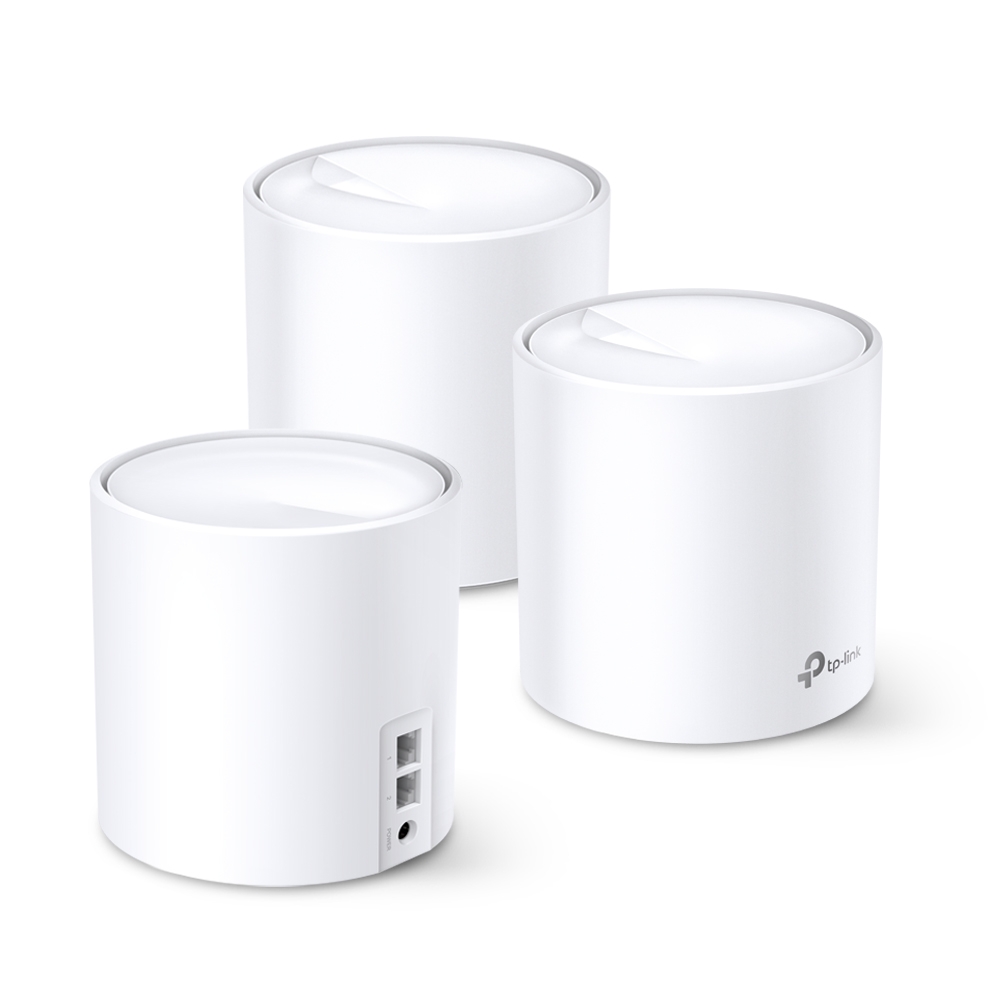
Create a seamless wireless network throughout your entire home or office with a Mesh Wi-Fi router from Overclockers UK. Explore a range of models available from manufacturers including ASUS, TP-Link, and Netgear. These Mesh Wi-Fi routers are available as single, double, or triple units, ideal for expanding an existing Mesh network or creating a new one. Traditional Wi-Fi routers can struggle to encompass a large office, or transmit their signals through walls, leading to areas receiving weak or even zero signal. Mesh Wi-Fi routers overcome this by using multiple nodes that work together to create a large area of coverage. Furthermore, many Mesh routers feature specialised software that can dynamically optimise network coverage across all nodes, so that all devices connected receive an equally strong signal.
What Affects Wi-Fi?
The signal from a router can be affected by several factors. This can lead to two users with the same device, receiving wildly different performance when accessing the a network. The following are just some of the factors that can cause a disparity in Wi-Fi performance:
- Distance Proximity to the router can have a drastic impact on the strength of the signal your device may receive. A typical Wi-Fi router can have an effective range of 100-150ft while indoors, beyond this you’ll find your performance will drop off.
- Obstacles As Wi-Fi signals are a form of radio waves, they are subject to being blocked by obstacles, such as walls, furniture, and appliances. Every object a Wi-Fi signal must pass through weakens the signal, which results in poor connectivity.
- Interference Other electronic devices cause network interference, such as mobile phones, Bluetooth, and even neighbouring Wi-Fi networks. These rogue signals can interact with the radio transmissions from your router, causing them to degrade over time, or even be lost, reducing the effective range of your Wi-Fi signal.
- Network Overload If all devices on your network are using the same Wi-Fi channel, it is feasible to run out of bandwidth to support all your devices. This can be further exacerbated if other local Wi-Fi networks also use the same channel, increasing the amount of congestion along those frequencies.
- Outdated Hardware Older routers are restricted to what Wi-Fi standards they can utilise. Many people choose to stick to the same router their ISP originally provides, which means they may miss out on many modern standards that newer model routers may have, such as Wi-Fi 6E. As such, the frequencies become more congested, leading to increased interference and more latency.

Want to Read More?
Utilising a Mesh network is a fantastic option to boost your network's performance over a wider area. Modern Wi-Fi standards, such as Wi-Fi 6, also boost the performance. Find out everything you need to know about this Wi-Fi standard on the Overclockers UK blog.
Read MoreMesh Wi-Fi Router FAQ
What manufacturers of Mesh Wi-Fi routers does Overclockers UK stock?
Here at Overclockers UK, we stock Mesh Wi-Fi routers from TP-Link, Netgear, and ASUS.
How many nodes do I need for a Mesh Wi-Fi network?
The number of nodes required for a Mesh network can vary depending on the network. Several factors can affect how many Wi-Fi nodes you’ll need for your Mesh network, including how much space you need to cover, whether there are obstacles to overcome, and interference from inside and outside your network.
Will a Mesh Wi-Fi router increase internet speeds?
A Mesh Wi-Fi router won’t increase overall internet speeds for your network. However, it will ensure that all users on your network receive the same speeds.
How do you set up a Mesh Wi-Fi network?
There are several steps to setting up a Mesh Wi-Fi network, which will usually be listed in the instructions that come with your hardware. However, the general steps include:
- Connect the primary node to your modem
- Power on the primary node and allow it to boot up
- Configure the network via a web interface on your PC or a mobile app
- Position additional nodes where required, and connect them to the primary node
- Once all nodes are connected, perform a network test and troubleshoot any issues
The Overclockers Difference

Innovative Products and Exclusive Brands
Overclockers UK not only offers next day delivery on thousands of products but also stocks exclusive brands from cutting-edge manufacturers including AMD, Intel, Asus, Gigabyte, Team Group and an ever-growing range of ultimate performance overclocked elite-tier hardware approved by 8 Pack.

Industry Leading Customer Support
Whether you are after advice, product information or even aftersales support we are here for you. Overclockers UK offers unparalleled customer service which is available across multiple platforms including telephone, social media, email, webnotes, live chat, and even a dedicated section on Overclockers forum. We even offer a 3 year warranty on our own PC's.

5 Star Service
Overclockers UK are rated one of the top PC, hardware and peripheral retailers in the country. From premium products to a personal shopping experience. You can trust us to deliver an unbeatable 5-star service.
Subscribe and Save

Subscribe to the Newsletter
Sign up to our weekly newsletter and get the latest news, offers, and deals directly to your inbox. Don't worry you can unsubscribe at anytime.
Stay Up To Date
Keep me up to date with the latest news, product launches and promotions
* Required field
Our customers know our services and this is reflected in the rating they give us. Leave us your opinion and help us to improve it.
What our customers say about us